
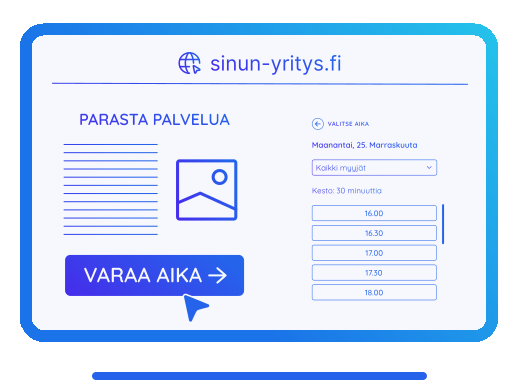
A modern booking calendar for your business
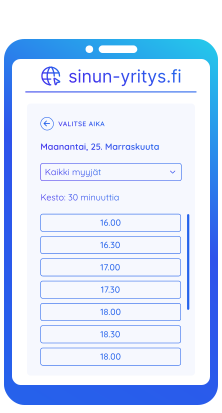
Common problems that modern appointment booking solves
Manual scheduling takes time and costs money. By automating the process, you improve the customer experience and free up your own time.

The customer wants to book right away
More than half of all bookings are made in the evenings and on weekends. Don't let a customer go to a competitor just because no one answers the phone.

Unnecessary email back-and-forth and phone calls
The customer sees available times directly from your calendar. An automatic confirmation is sent when a booking is made, so you don't have to do a thing.

Missed appointments
The system reminds customers via email or SMS before the appointment, significantly reducing no-shows.

Complex schedules and services
Set different durations for different services. The system automatically includes buffer time between bookings so you can prepare for the next one.
A modern booking calendar for your business
Common problems that modern booking solves:
Manual scheduling takes time and costs money. By automating the process, you improve the customer experience and free up your own time.
The customer wants to book right away
More than half of all bookings are made in the evenings and on weekends. Don't let a customer go to a competitor just because no one answers the phone.
Unnecessary email back-and-forth and phone calls
The customer sees available times directly from your calendar. An automatic confirmation is sent when a booking is made, so you don't have to do a thing.
Forgotten appointments (No-shows)
The system reminds the customer by email or text message before the appointment, which significantly reduces forgotten meetings.
Complex schedules and services
Set different durations for different services (e.g. 15 min assessment or 2 h installation). The system automatically accounts for buffer times between bookings so you have time to prepare for the next one.
When a customer is ready to move forward, every extra step can affect their decision. Direct booking reduces friction and makes the experience smoother at the right moment.
A modern booking experience delivers better results
When you remove booking barriers, you give your customers the freedom to choose the time that suits them best. Automation takes care of calendar syncing, confirmations, and meeting links. This way, bookings happen without extra admin work.

Seamless calendar synchronization
Bookings in the evenings and on weekends
CRM integration
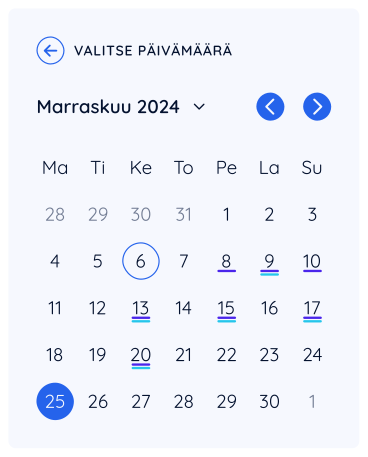


A modern booking experience delivers better results
By removing barriers to booking, you give your customers the freedom to choose the time that suits them best, whenever they want. Automation takes care of calendar synchronization, confirmations, and video meeting links, so you can focus on what matters most: the meeting itself.
Seamless calendar synchronization
Bookings in the evenings and on weekends
CRM integration

Seamless management and automation
Free up your time from manual work
The Easybook calendar isn’t just a booking view, but a complete tool that manages your scheduling for you. It automatically syncs data with your CRM, prevents overlaps, and lets your customers book your services at the time that suits them best.
Manual work
Conversion
Fast booking for the customer
Seamless management and automation
Free up your time from manual work
The Easybook calendar is not just a booking view — it is a comprehensive tool that manages your schedule on your behalf. It automatically syncs data with your CRM system, ensures no double-bookings occur, and gives your customers the ability to book your services whenever it suits them best, even outside business hours.
Manual work
Conversion
Fast booking for the customer
Frequently asked questions
Here you’ll find answers to the most common questions about the Easybook booking calendar
No. The calendar syncs in real time with your Google or Outlook calendar. If you add an event or someone books a time, that slot is immediately removed from the booking page.
The price of the booking calendar depends on the features you need and the number of users. Basic plans start from €20 per month.
Yes. You can add multiple employees, each with their own working hours and individual calendar synchronizations. The customer can choose a specific expert, or the system can offer the next available time from any of them.
Of course. You can set fixed working hours, special schedules for specific days, and even limit how far in advance or how last-minute bookings can be made.
You can set automatic buffer times between bookings. The system ensures appointments don’t start immediately after the previous one ends.
The best calendar is one that’s easy for customers to use and automated for you.
Yes. A calendar can often increase bookings because it lowers the barrier to booking. When a time is instantly available, more customers go through with the booking.
Yes. The system supports full two-way synchronization with both Google Calendar and Outlook. This means that when you add an event to your calendar, that time is automatically removed from available booking slots.


We can review your situation together
We'll take a quick look at your site and see where we can help
Latest news on customer meetings
Read our latest tips and guides for better customer service and digital sales
Kuinka rakentaa toimiva chatbot verkkosivuille?
Kooste: Toimivan chatbotin rakentaminen verkkosivuille alkaa aina yhdestä asiasta: pitää määrittää, mitä chatbotilta oikeasti halutaan. Chatbot voi olla yksinkertainen…
What does AI customer service chatbot maintenance include?
Kooste: AI-asiakaspalvelun chatbot ei ole työkalu, joka vain asennetaan verkkosivuille ja jätetään sen jälkeen toimimaan yksin. Jotta AI-chatbot tuottaa…

Easybook: A new partner for Shopify merchants
Easybook is now an official Shopify partner, and the app is available directly from the Shopify App Store.